Inspired Minds: Activity Ideas
- 3.8
- Rating
- 50.00K
- Installs
- Free
- Price

 Analysis by App-foxy
I found Inspired Minds: Activity Ideas most useful as a gentle starting point for parents who want to encourage creativity but do not always have a fresh project ready. It is a parenting app from I Teach Tiny Humans, LLC, built around educational ideas rather than entertainment for its own sake. The central experience is simple: open it when you need inspiration, look for an activity that fits the moment, and turn that suggestion into shared time with your child.
That simplicity is also the reason I would not treat it as a complete parenting curriculum. It works best as a practical idea shelf, especially for families trying to move beyond passive screen time. My experience with it was less about following a rigid program and more about choosing an activity that matched a child’s mood, attention span, available materials, and willingness to participate.
How the app feels to use in everyday family life
I use this section to focus on the practical rhythm of turning a prompt into time together: choosing an idea before inviting a child, keeping the first attempt small, and leaving room to change course. That approach matters because a creative suggestion is most helpful when it fits the family’s energy and available space, rather than becoming another task to complete.
You May Also Like

 Blood Strike: 2.5 Anniversary
Blood Strike’s Loadouts Turn Every Drop Into a Tactical Gamble
A close look at Blood Strike’s custom loadouts: how fast access to signature weapons reshapes its battle royale rhythm, rewards preparation, and narrows the gap between fights.

 Pandora - Music & Podcasts
Pandora’s Music Is Easy to Start, but Harder to Recover
Pandora’s strength is its low-effort path from a seed to a station. Its weak spot is how much confidence it asks you to place in connection, setup, and quiet recovery.

 8 Ball Pool
 Is Built on Rivalries, Rematches, and Routine
A close look at the rivalries, rematches, shared routines, and unanswered safety questions that turn a quick pool match into a persistent mobile community.

 Samsung Music
’s Quiet Strength Is Playing What You Already Own
Its reach comes less from spectacle than from dependable access to a personal library. That simplicity is both the app’s strongest retention engine and its ceiling.

 AccuWeather: Weather Radar
AccuWeather Review: A Quick, Clear Forecast for Everyday Decisions
For everyday plans, the best forecast is the one you can understand quickly. AccuWeather makes rain timing, radar, and local conditions easy to act on, with a few trade-offs.

 Hill Climb Racing
Why Hill Climb Racing Still Turns Crashes Into One More Run
A tiny car, a bumpy hill and one more upgrade: Hill Climb Racing keeps resurfacing because its simple chaos makes every near-miss feel personal.
More From Our News Desk
View All News


Readable enough for quick decisions
The most important quality in a parenting resource is often not originality but usability. Parents usually open an app with one hand while supervising a child, preparing food, or searching for something to do before everyone loses patience. Inspired Minds: Activity Ideas makes sense in that context because its purpose is immediately clear: it offers creative prompts for children and helps an adult decide what to try next.
I appreciated that the app is easier to approach than a long parenting book or a large collection of scattered web pages. Those alternatives can contain excellent ideas, but they often make the parent do too much filtering. Here, the useful question is more direct: what kind of creative invitation can I offer right now? That narrower focus reduces the mental effort involved in getting started.
For a parent who prefers highly structured instructions, the experience may feel less satisfying. An idea is not automatically a complete lesson plan. You may still need to gather supplies, adapt the wording for your child, decide how long to continue, and work out what to do if the activity does not hold attention. I see that as an important distinction: this app supports the adult’s planning, but it does not replace the adult’s judgment.
Navigation matters particularly when the child is already waiting. I found the best workflow was to browse before announcing an activity, then choose one option rather than showing a child an endless stream of possibilities. Too much choice can turn a creative moment into negotiation. Selecting a single prompt in advance made the app feel like a tool for action rather than another source of distraction.
A resource for creativity, not a digital babysitter
The store summary describes an educational resource for inspiring creativity, and that is a fair way to understand it. The app is not something I would hand to a young child and expect to manage independently for a long period. Its value comes from the conversation and making that happen away from the screen.
That makes it different from drawing apps, video platforms, and game-based learning products. Those alternatives can give children immediate feedback and may be easier to use without adult involvement. Inspired Minds: Activity Ideas instead asks the parent to become the facilitator. For families who want a prompt that leads into cutting, drawing, building, pretending, or experimenting, that is a strength. For someone seeking an app that occupies a child while they complete another task, it is a poor match.
I would also compare it with ordinary online searches. Searching the web can produce more variety, but it brings distractions, inconsistent quality, and a greater chance of finding an activity that is unsuitable for the child’s age or the materials available at home. This app offers a more focused route. The trade-off is that a general search may be better when you need a very specific project, such as an idea using one particular household object or one narrow developmental goal.
Motor and sensory considerations need adult adaptation
Creative activities can be wonderfully flexible, but flexibility does not happen automatically. A child with limited fine-motor control may need larger materials, fewer steps, or permission to respond verbally instead of producing a finished object. A child who dislikes certain textures may need a dry alternative to a messy activity. I would use the app as a prompt, then change the method without treating the original suggestion as a test that must be completed correctly.
This is one of the app’s practical advantages: an activity idea can often be scaled up or down by the adult. You can shorten it, remove a difficult step, offer a choice between tools, or let the child direct the process. The creative goal can remain while the physical demand changes. In my view, that is more useful than a rigid activity sequence that assumes every child will hold materials, sit, speak, or draw in the same way.
Still, parents should not confuse adaptable ideas with built-in accessibility support. The app does not become accessible to every child simply because an activity can be modified. A child may need visual schedules, communication supports, extra preparation time, a quieter environment, or direct assistance from someone who understands their needs. Those adjustments come from the caregiver and the setting, not from the app alone.
Sensory load is another area where context matters. A project involving movement, noise, unusual textures, or a crowded work surface may be exciting for one child and overwhelming for another. I recommend previewing the idea first, especially if your child is sensitive to mess, sound, bright materials, or unexpected changes. Keeping a low-stimulation backup ready is a smart habit: if the first activity is too much, you can switch without making the child feel that they have failed.
One useful approach is to separate the creative objective from the sensory experience. If the aim is to explore colors, the child might choose colors with cards, objects, or speech rather than touching paint. If the aim is storytelling, the child might dictate while the adult writes. If the aim is construction, the child might arrange large pieces while someone else handles smaller parts. This kind of translation is where the app becomes more inclusive in real life.
How I would use it with different ages and abilities
The age rating is Everyone, which makes the app broadly approachable, but that label should not be read as a promise that every activity suits every child equally. A preschooler, an early reader, and an older child may need entirely different levels of explanation and independence. I would introduce the idea in simple language for a younger child, while giving an older child more control over the theme, materials, or final result.
For children who are not yet comfortable reading, I would read the prompt aloud and demonstrate only the first step. Demonstrating too much can accidentally turn an open-ended activity into imitation. For children who read confidently, I would let them select between two options and explain what they want to change. That small choice can make the activity feel collaborative rather than assigned.
Children with attention differences may benefit from a visible stopping point. Instead of saying “keep going until it is finished,” I would set a short trial, such as making one part of the project and then deciding whether to continue. This protects the activity from becoming a demand. It also gives the child a genuine choice to stop, alter the idea, or start again.
For children who communicate differently, the app can support participation if the adult accepts multiple forms of response. Pointing, selecting, arranging, gesturing, using a communication device, or watching before joining can all be meaningful involvement. I would avoid judging success by how much the child talks or how closely the finished result resembles an example. The strongest outcome is often the child making a choice and seeing that choice respected.
A realistic after-school scenario
Imagine arriving home with a child who is tired, restless, and not ready for homework. You have a short window before dinner, and the house is not prepared for a complicated craft. I would open the app before involving the child, choose an idea that can be reduced to a few steps, and collect only the materials already within reach. Then I would present it as an invitation: “Would you like to try this, or change it?”
If the child joins for five minutes and then loses interest, I would count that as useful information rather than failure. The parent can photograph the work if that is meaningful to the family, leave it available for later, or end the activity without a forced conclusion. The app’s role in this situation is to remove the blank-page problem. It gives me a direction, while I remain responsible for timing, safety, and emotional tone.
That workflow also reveals a subtle limitation. The app can help me find an idea, but it cannot know whether my child has had a difficult day, whether the kitchen table is available, or whether siblings are likely to interrupt. The best results come when I treat the suggestion as a flexible starting point rather than another obligation on an already busy schedule.
Situational access: home, travel, and shared care
Inspired Minds: Activity Ideas is most convincing in a home where an adult can prepare a small space and participate. It can also be useful during travel or a waiting period, provided the chosen activity does not depend on a full craft setup. I would plan ahead in those situations instead of browsing at the last minute, because the practical value of an idea depends heavily on what is actually available.
For shared custody, grandparents, babysitters, or older siblings, the app can provide a common starting point. A caregiver can choose an activity and adapt it to the child’s routine without needing to create a full lesson from scratch. The important step is to communicate the child’s preferences clearly: what materials are comfortable, what kinds of choices work well, and what signs mean the activity should pause.
In a classroom or group setting, I would be more cautious. An activity that works beautifully one-to-one may become difficult when several children need materials, explanations, and turns at the same time. The app may help a teacher or group leader brainstorm, but it should not be treated as a substitute for classroom planning. Different motor abilities, sensory needs, language levels, and cultural experiences can make a single activity land very differently across a group.
It is also worth considering the adult’s own access. A parent who is tired, has limited mobility, or finds preparation difficult may need activities that involve very little setup and allow the child to work near them. I would filter ideas by the energy they require from the caregiver, not just by how appealing they sound. A brilliant project that demands constant hands-on help is not practical on a day when the adult has no capacity for it.
Where the app still creates friction
The free price makes it easy to try, but the app includes in-app purchases ranging from $6.99 to $39.99 per item. That changes how I would approach it. I would explore the free experience first and decide whether the available material genuinely fits my family before spending anything. A paid addition may be worthwhile for a parent who uses the ideas regularly, but occasional users may prefer to keep a small personal list of activities that already work.
The app has a 4.0 average from around 73 ratings and 15 reviews, with over 10K installs. Those figures suggest an established but still relatively small audience rather than a universally tested parenting standard. I would take that as a reason to judge it by my own household’s needs. A rating can indicate general satisfaction, but it cannot tell me whether the reading level, activity style, or amount of adult involvement suits my child.
The current version is 5.1.0, and the app was released on April 2, 2023. It runs on Android 7.0 or later, which covers many older devices but still makes the operating-system requirement worth checking before installation. I would also remember that an older phone can make browsing less comfortable, especially for a parent trying to work quickly while supervising a child.
Another barrier is expectation. The phrase “activity ideas” may lead some parents to expect detailed supply lists, developmental explanations, progress tracking, or a complete sequence from beginner to advanced. I would not choose this app if those features were essential to my decision. It is better suited to inspiration and shared experimentation than to measuring achievement.
There is a further emotional risk in any creativity resource: adults can unintentionally turn open-ended play into a performance. If a child does not want to make the suggested project, I would not push simply because the app recommended it. The child may prefer to observe, change the subject, use different materials, or invent something unrelated. Preserving that freedom is more important than finishing the prompt exactly as presented.
Who should try it, and who should look elsewhere
I would recommend this app to parents who regularly hear “I’m bored,” want more hands-on time with their children, and appreciate having a prompt ready when their own imagination is tired. It is also a good fit for caregivers who enjoy adapting activities rather than following instructions word for word. Families with limited time may find the idea-first approach helpful because it turns a vague intention into a concrete next step.
I would be less enthusiastic for parents seeking a fully self-directed child experience, a formal educational sequence, or detailed support for a particular disability. In those cases, a specialized resource, an occupational-therapy-informed activity collection, or a structured learning platform may be a better choice. A general creativity app cannot provide the individualized guidance that some children need.
I would also skip it if you dislike paying for optional content without knowing whether you will use it often. The free entry point lowers the risk, but the purchase range means it is sensible to establish a routine first. If you open the app once, try an idea, and never return, buying a larger package would not make much sense.
My inclusive verdict
Inspired Minds: Activity Ideas succeeds when it is used as a flexible bridge between a parent’s intention and a child’s own creativity. I like that it points toward making and interaction instead of asking the child to remain inside the app. Its strongest inclusive quality is not a special setting or a promise of universal access; it is the fact that an adult can reshape an idea around a child’s communication, movement, sensory comfort, energy, and interests.
That strength comes with responsibility. The caregiver must preview the activity, remove unnecessary barriers, prepare alternatives, and accept participation that looks different from the imagined result. If you want a ready-made program that handles those decisions for you, this will probably feel incomplete. If you want a source of prompts that you can bend to real family life, it is much more appealing.
For me, the best way to use it is to choose one idea, reduce the setup, offer the child meaningful control, and stop before the experience becomes stressful. The app is free to begin with, rated for Everyone, and developed by I Teach Tiny Humans, LLC, so it is approachable for a broad range of families. I would recommend trying it with modest expectations: not as a replacement for play, teaching, or individualized support, but as a practical nudge toward creative time together.
FAQs for Inspired Minds: Activity Ideas
01What is Inspired Minds: Activity Ideas and who is it for?
Inspired Minds: Activity Ideas is an app designed to provide creative and engaging activities for individuals or groups. It's ideal for educators, parents, or anyone looking to inspire learning and creativity in children or adults. The app offers a variety of ideas suitable for various age groups and interests.
02How user-friendly is the app for beginners?
Inspired Minds is designed with a user-friendly interface that makes navigation straightforward, even for beginners. The app categorizes activities by age group, interest, and difficulty level, ensuring that users can easily find and select activities that meet their needs without a steep learning curve.
03Are the activities available offline?
Yes, Inspired Minds: Activity Ideas offers offline access for most of its activities. Once you download the content, you can access your favorite activities anytime, anywhere, without needing an internet connection. This feature is particularly useful for those in areas with limited internet access.
04Is there a cost associated with using Inspired Minds?
The app offers a free version that includes a selection of activities. However, there is also a premium subscription available, which provides access to an expanded library of activities, exclusive content, and other enhanced features. Pricing details can be found within the app's store listing.
05How often is new content added to the app?
The developers of Inspired Minds frequently update the app with new activities to keep the content fresh and engaging. Updates typically include seasonal activities, educational themes, and user-requested content, ensuring that users always have access to the latest ideas and inspiration.
Pros
- User-friendly interface enhances navigation.
- Wide variety of creative activity ideas.
- Regular updates keep content fresh.
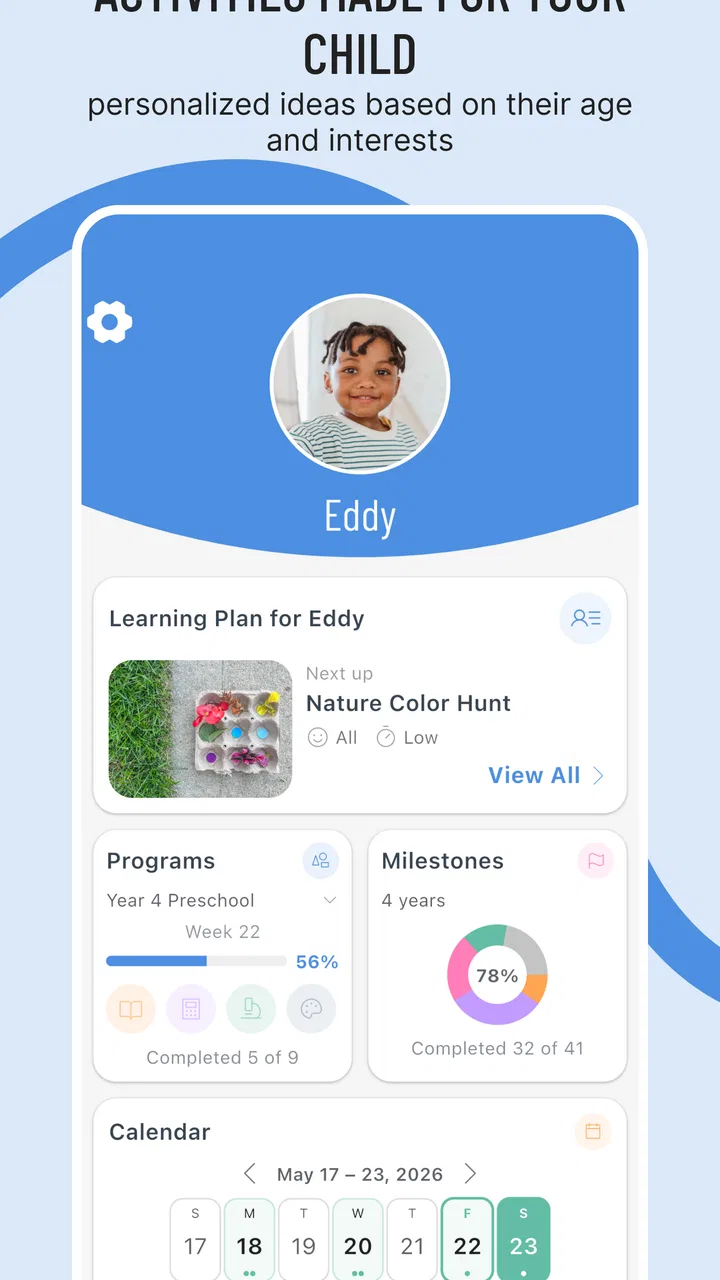
- Includes features for personalized planning.
- Suitable for all age groups.
Cons
- Limited offline functionality available.
- Some features require in-app purchases.
- Occasional ad interruptions.
- Initial load time can be slow.
- Limited language options.

Inspired Minds: Activity Ideas
Gallery